Welcome to this page

Welcome to my blog!
I am sharing stories of my trips and providing some tips in case you also want to travel.
This is also a photo blog, so I hope you like the candid photos I have taken from different places!

Thank you for visiting my blog.

- CB (freezymenthol)

Monday, April 11, 2011

Incredible India Through GE X5

I have already mapped out the out-of-the-country trips for the entire year, so going to India was an unplanned trip for me. I had to attend a Leadership Meeting, together with the "gods" of our company (VPs, SVPs and Directors). But of course, since we're there primarily for work, there will inevitably be days that we can go out and discover the sights that India (al least the Northern part) has to offer. So by default, we have to go to Taj Mahal!!! From Delhi, it will take around 4-5 hours to reach Agra, so its best that you leave very early. We left around 6:30am and arrived around 1:00pm. The Taj Complex is a huge, government maintained complex. A foreigner will need to pay INR750 entrance fee which already includes a wallet guide, bottled water, plastic feet covers (you'll need this once you enter the main tomb). It is also best to bring your passport should they ask at the security gate. You will first be welcomed by huge Fort. This is your first pit stop before you can even see the Taj Majal.
The picture below will give you a peek once your inside the fort - a majestic view of Taj Mahal.


After passing the complex, you will be welcomed by a lush garden and water fountain (at that time, the fountain was still turned off). From here, you can now take pictures of the grand tomb.


Because of security restrictions, taking pictures INSIDE the tomb is strictly prohibited, so this is the nearest that I can click using my GE x5.


Monday, April 4, 2011

Cherry Mobile Eclipse User Review

Cherry Mobile Eclipse: Who Says Smart Phones Need to be Expensive?


Follow me on twitter @freezymenthol

Cherry Mobile is one of the youngest players on the entry level handsets in the Philippines. It has become a popular choice for budget conscious people. But recently, they have also decided to enter the Smartphone market with both Windows based and Android based devices. The first Windows Phone that they have released was Cherry Mobile Eclipse with Windows Mobile 6.5 Operating System. I bought this phone at a very tempting price of Php4999.00. With that price, this can be considered the cheapest WinMo phone in the Philippine market. I already have an Iphone 4, but because I am a traveller and needed a phone that's open line and I could take anywhere without the fear of being charged with Globe's ridiculous roaming charges, I decided to buy this one. I still need a smartphone that I can work with and I think Eclipse with the WinMo OS installed would be fine.

The 3.2 inch screen is great. But be warned, native applications are stylus driven.


The box contents are just very basic - phone, stylus, charger, battery, cable, earphone and manual. You still have to purchase a separate memory card. It can accommodate up to 8GB of external memory. The build quality is just ok. The back cover is made of brushed metal paint, but under that is all plastic. The black front face really brings a professional impression. There is a 2-megapixel camera at back (very basic and not the best of quality). It also has a sensor so you can auto-rotate the screen. The left side houses the volume rocker, lock key and mini-USB port. The right side only has one button which is the camera shutter. There are three touch sensitive keys on the bottom of the screen.

It's brushed rear cover gives a very good impression


The honeycomb style menu is very thumb friendly, but once you go into the menus, you'll find yourself using the stylus


The WinMo 6.5 OS installed on the phone comes with the "Today Screen" and then a Honeycomb grid as the main menu. But when you go deeper into the interface, you'll find yourself already using the stylus (which I find really annoying). So what I did was to download applications to improve the user interface and allow thumb input rather than using a stylus. I have installed SPB Mobile Shell version 3.5.5 and SPB Keyboard. Both can be found at http://www.4shared.com/ or http://www.umnet.com/. The already has a built in Facebook application. It's not as snazzy as the Iphone interface but much better than the Nokie Symbian Facebook app. And of course, they'll know your using a WinMo phone everytime you update because the status will also have a footnote saying "via Windows Phone". Other native applications include MS office mobile suite (which I think is the edge of this phone over android and Iphone). It has a good calendar and email application. And because of this, I have migrated by portable email onto this phone. In short, I have passed the "work" phone to Cherry mobile Eclipse. My Iphone is now my personal non-office phone.

The default screen would be the "Today Screen" which offers a snazzy inferface just like with Microsoft Zune


The camera is offer very poor quality, but the additional options make it look usable as well. There's timer, brightness, modes and such. The video camera is also ok - only usable for email. Don't expect DVD quality videos on the phone. Below are some sample photos.


Multimedia handling is also ok. It has the Windows Media Player that can play music and videos. You can download a DIVX application so you can watch .avi videos. The loudspeaker is not that good though as well as the earphones that came with the package. Please bear that this phone does not have a 3.5 mm jack, which means you can't use any standard earphone. It only houses a 2.5 mm jack, so this means you need to buy an adapter (probably in CDR king). But, again, as a regular user, I don't mind because I have another gadget to complete my music-listening and video-watching needs. All in all, the Cherry Eclipse is very good phone for its price range.

If you are techie enough, you can download applications that will improve WinMo's user interface


The SPB Mobile Shell application gives a better interface for your WinMo phone.


This may be the cheapest smartphone, but it can be a work horse. Since it's WinMo, it very easy to sync office files, calendars and emails. Multimedia is ok, but it's nothing compared to the likes of Android and Apple. The good thing about the phone is the freedom for me to tinker with the interface and do whatever I want. This is what I miss about an open source system. Oh, and did I mention it's dual sim... "So pick a fruit - Cherry, Apple or Blackberry"

Saturday, March 26, 2011

Ipad 1 on Sale in the Philippines after Ipad 2 Announcement

(This was my first blog entry typed using Ipad)

Almost a year ago, one revolutionary device was announced by Apple, they changed mobile computing. They have reinvented a lot of devices from portable music player (Ipod) to mobile phone (Iphone). After announcing Ipad, then followed an onslought of similar devices mainly backed up by Android OS. The generation of tablets has started and whatever Apple-haters say, they have defined this category and this is the reason why they have 90% of the market share at the time of this writing.

Having said that, the entry level Ipad 16GB wifi did cost $499.00 in the US which is officially priced at Php23990.00. Although for Apple standards, the price is one of the cheapest, but of course its still expensive for a normal Pinoy, since other competing products provide cheaper alternatives - netbooks, Cherry Superion. And of course there are those ridiculous resellers at Ebay.com and Sulit.com selling he entry level Ipad 16GB at around Php27000 and above. And because of this, I decided not buy Ipad and just settled on getting an Iphone 4 and Iphone 3GS through my Globe Rewards Program.

And then there was the much awaited announcement of Ipad 2 a few weeks ago. This was an answer to other competing Android Tablets and an army of which arriving towards the end of the year. Ipad 2's entry level price was announced at $499. And then, I thought, knowing Apple's pricing pattern I assumed the Ipad 1's price was adjusted. And I was correct!!! The Ipad 1's price in the App Online Store was adjusted to $399 for the 16GB and the official price in the Philippines was adjusted to $19990. That's a Php4000 drop!!!

And so my interest in buying an Ipad was again renewed. Should I buy Ipad 2 - dual cameras, faster processor and thinner profile? Or should I buy, the now cheaper Ipad 1? I actually considered a lot of things. For one, I actually don't need the cameras since I already have that on my Iphone 4. A faster processir will help, but upon playing with Ipad 1 at one of the Mac Reseller Stores in Mall of Asia, I think Ipad 1 was still fast and responsive. And so I made a decision to buy the entry level Ipad for Php19,990.00

I would say it's worth the purchase. I am now using this to track my projects at work. I am now practically paperless at work from taking down notes and minutes of the meeting to planning my meetings and conference calls. This gadget was also a good companion to keep me entertained and informed with tons of games and apps. Plus the sync of both my Iphones and Ipad make it all the more interesting. Of course, I don't intend to jailbreak them.

Oh, and after the price adjustment, some resellers online still sell the Ipad 1 at Php27000 and above so be warned. If you are interested in buying the now cheaper Ipad 1, just go to Mac/Apple Reseller Store in ang of our Malls here in Manila. The Ipad 1 is still a competitive device and is still a looker so I won't consider it dated yet.

Monday, February 21, 2011

Weekend in Singapore, 2011

I took my GE x5 for a stroll over the weekend at Singapore. This is my first out-of-the country trip this year (2011) and apart from going to Universal Studios, Sentosa, Marina Bay and other hot spots around the city, I also look forward to taking a lot of photos using GE X5, just like what I did in Taipei. I do hope you enjoy some of the shots using my camera.


Of course, the Universal Studio Logo is a must to be taken. This is an early evening shot of the famous logo that stands in front of the theme park.


This is the Hollywood area of the theme park with a lot of restaurants and souvenir shops.
This is a photo of Battlestar Galactica and the Mummy Ride, two of the most popular attractions in the theme park

Another shot of the logo, we came in early and the park was still closed, so might as well kill time by taking photos.

The following day, we went to Marina Bay area and also took some pictures. This is a shot of the Singapore CBD from the balcony of the Marina Bay Sands Skypark. Here is a shot from another side of the balcony of the Skypark with a fantastic view of the Singapore Flyer
Now here is another angle of Marina Bay Sands from the park adjacent the Singapore Flyer.
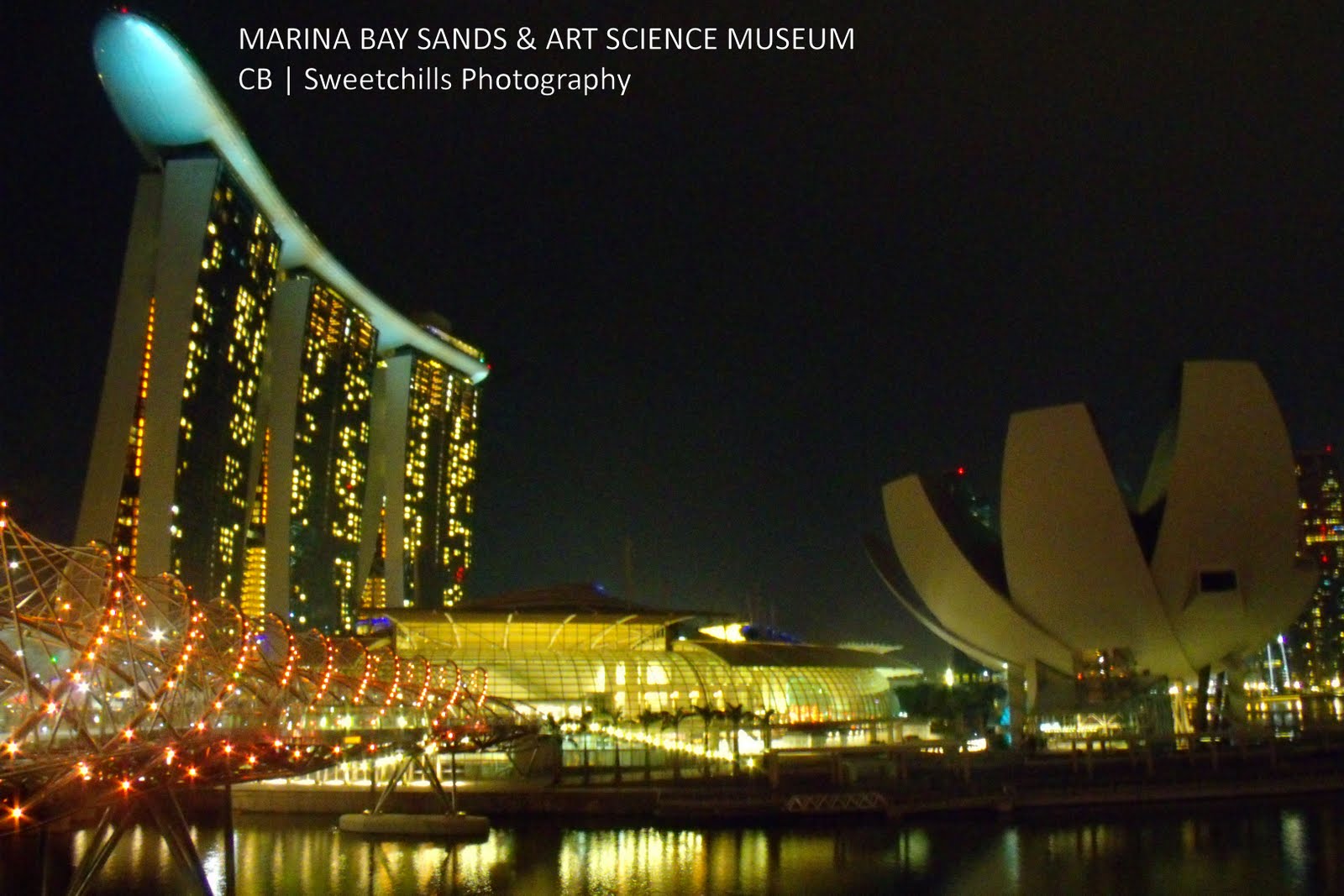
Here are some great photos of Marina Bay Sands and other adjacent buildings like the ArtScience Museum, Marina Bay Mall, etc. Another night shot of the Singapore skyline Singapore CBD taken from the Marina Bay Sands Skypark.
I just can't help but take more shots of Marina Bay Sands.


Saturday, February 12, 2011

GE X5 Fireworks Shots - 2nd Pyromusical Competition

It has been a while since I used my GE X5 for artistic shots, simply I don't have time for the past couple of weeks to do this. But last 2.11.11, I just have to bring my camera and my tripod and watch the 2nd Annual Pyromusical Competition at Mall of Asia Bay Area. I can still remember last year how I used my Canon 1000d for the event and produced great results, but that was a thing of the past. I am confident that with GE x5's manual capabilities, this camera can be at par with the shots I took last year. True enough, this little gadget did not disappoint me, so here are some of the pictures I have taken from GE x5.


The Pyromusical Competition will run all Saturdays from February 12 to March 12, 2011 at the Mall of Asia Bay Area. Ticket would range from Php100 to Php1500. But I would suggest for you to get a decent reservation at any veranda restaurants in the bay area. You can get as much as Php300 per head which is already consumable, depending on the restaurant you want to dine.

Sunday, November 28, 2010

Iphone 4 Review, Camera Samples

Iphone 4 Review from a Regular User

Note: This is not a tech review, this is based on a normal end-user.

It's been a while since the last time I made a review of a mobile phone I recently purchased. I was not really an Apple fanboy before, I did not make any big deal about the Iphone and it's iOS operating system. Even with 3 iterations, I would still opt to buy a regular phone from the safer brands - Nokia, Samsung and Sony Ericsson.

What made me switch to an Iphone 4 were two things: (1) When a purchased Ipod Touch 3rd Gen, and (2) When I was eligible with my mobile carrier's (Globe Telecoms) loyalty award.

The ipod touch 3rd gen made me introduce to the iOS ecosystem. It was user friendly and the apps were just totally awesome. But the loyalty award was really the deciding factor to purchase one because I only got this phone for Php9000. It was really a great deal.

There are so many good things to say about the Iphone 4, but there are few flaws as well.

The display is was really sharp. Comparing with my Ipod Touch (which I sold eventually), the resolution difference was really clear. The improved processing speed made multitasking easier and responses faster. With the most updated OS, downloading apps was a lot easier since all of them are now compatible on the new version. By default, the pre-istalled apps would do the work of a regular smartphone. But downloading specific apps would make it a workhorse.

One example was when I went to Taiwan for a backpacking trip. I avoided the pains of paying roaming charges whenever I call my family from my hotel, I would use the default wifi connection to do a facetime call (my brother has an Ipod touch 4). Or, I would call him via the latest update on Yahoo Messenger App. I would also do wifi based SMS through the Chikka application.

I was on leave from work when I was in Taipei, but I had to make a few calls and a little work. And Iphone 4 just did the job! I was able to check my emails with attached screenshots. Most phone would just display plain text (e.g. Blackberry). I was able to access my work desktop through the Citrix App. And I was able to facilitate a Webex Meeting. And yes! These are all available on the Iphone.

The map and GPS application helped me find my way in Taipei. The photo and video application (samples below) captured places I have been in Taipei. The music and games kept me pre-occupied while waiting for my flight.

Overall, this is a complete mobile phone. Some of the things that could've improved would be its battery life. At times, it would last for 24 hours under heavy usage. But would last for 3 days if there's a lot of standby time. Buying a case is a must, since it's a fingerprint magent, but this hides the design of the phone, so I would suggest buy a transparent case.

Below are some sample pictures and videos that I've taken during my trip.


Sunday, November 14, 2010

Taipei Video shot through GE X5


Here are some video clips that I have compiled during my trip in Taipei last October, 2010. I used GE X5 video recording and the clips were really great.